Wednesday, March 28, 2012

Google Apps

I just spent $699 (of my school's money), to purchase 2 copies of Microsoft Office 2011 Home and Office Edition with a total of 4 licenses.  This just seemed ridiculous to me when we can pretty much do everything we need to for free on Google Apps.  Unfortunately, I haven't been able to convince my administration or staff that this is the way to go.  I think there is real fear in the idea that our "stuff" is stored as part of "the cloud" and that it might somehow disappear or security may be compromised.  In "Supporting 21st Century Learning Through Google Apps," Nevin (2009) points out that many schools are using Google Apps Education and some schools are even "dumping" their email programs in favour of gMail. (Nevin, 2009)  I can understand some hesitation about this when thinking about the nature of some of the emails we send - confidentiality is definitely a concern.  The optimist in me, however, says it must be safe if so many secondary and post secondary institutions are making this choice.

The cost saving measures for schools, as pointed out by Nevin (2009), can be significant. I think of the $699 I just spent and the time our tech support people spend on email issues, setting up accounts, and updating software.  Just today, I spent an hour configuring a laptop for a new staff member and I know that time could have been cut in half if I didn't have to do all the email account information and add Microsoft Office.

There are a lot of advantages to cloud computing and I am trying to introduce some of the basics to my students.  As I said in my inquiry update, my school uses Mac computers and many of our students have PCs.  Knowing how to use Google Docs is saving me as the librarian, and my students, a lot of time.  Before Google Docs, many students (and some still do) would come to me because they could not open their file at school.  Now, every time I help them, I also show them Google Docs.  Most of the students, like I was, are unaware that they already signed up for Google at some point in their internet explorations and thus Google Docs is only a "click" away.  I also tell them that they can just cut and paste a document from their word processing program into Google Docs to access it at school - this has a much higher success rate than emailing the document and sometimes even better than bringing it on a USB drive.


Google provides a multitude of ways for us to connect to each other and our work.  I am finding cloud computing more and more helpful as I use a laptop and desktop at school and then have another desktop at home.  Because my versions of OS on my desktops and laptop are not compatible with iCloud, Google Docs is functioning in the same way for me.  I like to work on the larger screen of my home desktop, so by saving my work in Google Docs I don't have to worry about my small USB drive or emailing the work to myself for school the next day.


In looking at my list, I realize that I forgot to mention, in my discussion of my inquiry into surveys and polls, that I also used Google Forms to create a survey for my library web site.  I just set up the initial form but did not finish creating my survey.  After thinking about my learning with Google Apps I think I will revisit this survey tool and reread some of the suggestions from the "Google Form Uses" shared document that I have saved.

As part of my introducing Google tools to my students, I always take the time to introduce the navigation tabs at the top of their Google search page.  Often they are only familiar with Images, and do not notice the other options available.


I haven't had an opportunity to explore Google Play yet, but it is interesting, and probably a good move that they took it from the "More" tab, to its own position on the navigation bar.  My quick browsing of this app seems to indicate that it is Google's answer to iTunes.    

Under the "Even More" tab, my favourite Google App is Google Scholar.
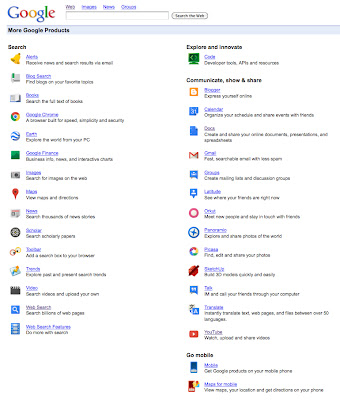


When I was teaching my English 12 students how to properly cite sources, we used Google Scholar as a source for documents on which to practice our citation skills.  It was also a great way for students to see the difference between a "regular" Google search, and the results they get in Google Scholar.  Of course this does not replace the access to post-secondary libraries but it offers results that are more credible than Wikipedia.

Another Google App that I am endeavoring to make part of my Web 2.0 world is Google Calendar.  I like the features of Google Calendar and that it is very similar to iCal, the program I am more frequently using.  I think the problem for me in adopting Google Calendar is that my Entourage email has a calendar feature and I also have iCal on my computers.  The need for a mobile device like an iPhone (ok, last shameless plug directed at my husband, LOL) is again an issue when thinking about a calendar program.  I think the reason I return to my handwritten notes in my hard copy daybook is because I have too many calendar options.

As mentioned by Nevin (2009),  Google Apps like the calendar tool, give users the opportunity to access their calendars wherever they have internet access or a mobile device with this ability.  Google calendar has the potential to be a great service for students who often do not write down due dates or deadlines, but always have their phones or iPods.  (Berger & Trexler, 2010)

One of the features I like about Google calendar is the colour coding and notification features.

I tend to favour the "pop-up" reminder over the email, but it depends where I think I will be when I schedule the reminder - the great thing is, I can also choose both.

The funny thing about all of the calendar options I use and have explored is that I still rely on a "traditional" book style, one-month view calendar at home.  Perhaps if I had a computer screen built into the cupboard in my kitchen that tends to be the "hub" of our home, I would move to a digital calendar for our home, but right now that is not an option and the home computer in our office is not accessible enough for this purpose.

I feel that I still have a lot more exploring to do with Google Apps.  Like most of the other tools in my inquiry, one exploration leads to another, and another, and another.  I found that Google was changing as I was learning, and that I sometimes had to be willing to abandon a previous tool if I wanted to truly adopt the new Google tool.  One of the most important things I am taking away from my exploration of Google Apps is the possibility of it replacing some or all of our software programs at school.  I see this as a cost and time saving measure and a way to alleviate some of the pressure on me to be a technology goddess.  (Although I do love it when I can solve a technology related issue for a staff member just by entering a room, which has happened on a few occasions - my magic teacher-librarian wand I tell them.)


References:

Barack, L. (2010). Schools Opt for Google Apps. School Library Journal, 56(6), 12.

Berger, P. & Trexler, S. (2010). Choosing Web 2.0 tools for learning and teaching in a digital world.
     Santa Barbara, CA: Libraries Unlimited.

Nevin, R. (2009). Supporting 21st Century Learning Through Google Apps. Teacher Librarian,  
     37(2), 35-38.

Richardson, W. (2010). Blogs, wikis, podcasts, and other powerful web tools for classrooms.
     Thousand Oaks, CA: Corwin.

Google Reader

After discovering that I was already signed up for Google Reader, I did not explore any other RSS feed options.  The best thing I did to make Google Reader more accessible was make iGoogle my home page and then add the Google Reader gadget to my iGoogle.


I really like that I can see the new posts on my feed and even get a "quick view" by clicking on the title of the new post.  I am still working on training myself to add sites/blogs I visit to my Google Reader feed.  I have found that there are great links on Twitter and sometimes I "favourite" the tweet when I could just add the link to my feed and get the updates right on my home page.

I did spend some time organizing my list of sites/blogs I am following.

I created some basic categories to represent the current list of items I am following.  I can see refining this list as my feeds grow.  For example, "education" is a pretty broad category.  I know I may want to divide that into my teaching areas - like English 12, Literature,  or Leadership.  I can also see being more specific with my library feeds.  Richardson (2010) suggests taking the time to become comfortable with subscribing and managing and then you can play with some of the more advanced uses for Google Reader.


I try to keep on top of the new feeds that come in, but I have used the "mark all as read" button a few times, just to prevent feeling overwhelmed.  What I do like is the "star" feature that allows me to save specific posts that I want to revisit or read a little more closely.


In the past, I would bookmark or save pages and then never look at them again or forget they were there.  Because Google Reader is visible on my desktop all the time, I actually spend time reading and often commenting on feeds that I receive, but I can also save them in the same place so they are not so easily forgotten.  In a recent interview in Teacher Librarian (Valenza, 2011), Bobbi Newman points out that Google Reader shouldn't dominate your life, it should be "the servant, not the master." (Valenza, 2011, p. 28)  This shows how important it is to organize our online worlds and then make the tools work for us.  It took some exploring and "playing" for me to find the right visual tools to include on my iGoogle page, but now that I am happy with the set up, I find I am spending less time browsing, and more time reading meaningful ideas and posts.  Valenza (2010) talks about "weeding" and organizing her own networks like we do in the library.  It is important to stay on top of our feeds, which feeds are outdated or no longer reflect our PLN or needs?  Which feeds are inactive?  I also already find myself being more selective in the subscriptions I choose to add.  In a very Sienfeld moment I find myself wondering if this blog is "Google Reader worthy."

Reading about feeds, or "aggregators" has given me a better understanding of how they work so that I can add them to my reader, but also make my blogs available for others to follow. (Berger & Trexler, 2010)  I am hoping to encourage my students to add a feed reader to follow our class blog so that they can instantly get the updates, especially on their mobile devices.

Another thing I plan to continue to explore with Google Reader as suggested by Richardson (2010), is tagging the posts I want to save with my own tags.  Reader will then group them in folders for me.  This will be a great way to store ideas for future lessons or ideas for my library.  It would also be a great way to store material for presentations and professional reading and sharing.


References:

Berger, P. & Trexler, S. (2010). Choosing Web 2.0 tools for learning and teaching in a digital world.
     Santa Barbara, CA: Libraries Unlimited.

Richardson, W. (2010). Blogs, wikis, podcasts, and other powerful web tools for classrooms.
     Thousand Oaks, CA: Corwin.

Valenza, J. (2011). In My Network Confession…. Teacher Librarian, 39(2), 27-32. 

Power and Technology

So... nothing like realizing how much you rely on technology when the power goes out at school for 2 hours and then you have to spend 2 more hours getting the server, wireless hubs, printers and computers all working properly again.  It also adds to the stress of the assignment procrastinator too...

Tuesday, March 27, 2012

Survey/Poll tools

I struggled a bit with this part of my inquiry.  I think part of my struggle stems from not really having a vision as to what I wanted to achieve by using a survey or poll.  I always think it's fun when there is a poll question on a web site, and I usually take the time to answer, but I was not clear as to how this might be helpful for me and my school/library.  Berger & Trexler (2010) point to polls and surveys as "powerful tools" that can be used to access opinions, determine the "attitudes of participants," and to "expose participants to the diversity of opinions." (Berger & Trexler, 2010, p. 110)  I think where I struggled is I don't really have participants yet.

One of my goals this year has been to get students using the library and the library web site.  I have had much success with getting the students into the physical library, but it has been more of a challenge to get them to use/visit the web site.  I know that one of the reasons for this has been my failure to offer an introduction to the site to all of the students - other than the grade 8's, the rest of the students probably don't know the library has a web site.  I am now using Facebook to promote the library and school web sites so I hope I will see some increased site traffic.

I tried three different survey/poll tools - SurveyMonkey, PollDaddy, and Easypolls. I began with SurveyMonkey as that was the tool I was most familiar with, in name only.  


One of the things that impressed me with all three sites was the great tutorials they offered for help.  The instructions were clear and the FAQ were helpful.


PollDaddy even sent the above email with links to help me learn how to make the products they offer.  One thing I did notice with all three poll options, is that the really desirable poll/survey options require the "pro" options, meaning I would need to pay for the service.  Because I was exploring I chose to maintain the free options for all three sites.

My first attempt at creating a survey with SurveyMonkey was not very successful.  I began by using one of their templates but then became frustrated because I couldn't change the questions even though their help information said I could.  When I created my second SurveyMonkey survey, I did not use a template and had more success.

As a side note - one of the things I am liking about many of the Web 2.0 tools I explored and am using, is that I can log in using my Google account.  This has made it much easier to log in without having to remember which password and user name I used to create my account.

I wanted to embed the survey on my library web site as a pop up but I could not seem to make it work.  I think it is because I am using Weebly and did not write the code for my site myself.  The SurveyMonkey instructions say...


The problem is that I cannot find the <body> tag in html to allow me to create the pop up survey.  Instead I added the survey to the top of the home page.


Looking at this I realize how dumb it is to ask "Have you visited the Hope Secondary Library web site?" when the survey is on the web site so the respondent would have to have visited the site.  Creating these surveys and polls has also made me realize that there is a real science to forming the questions - it is not as easy as I thought it was going to be.

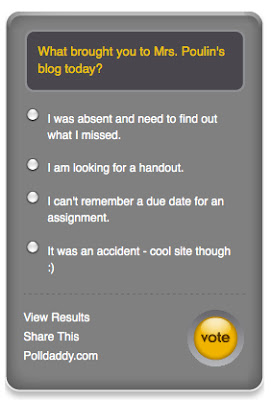
For my PollDaddy poll I decided to create a poll for my class blog to find out what had brought people to the page.  My hope is that the poll will reveal that students are visiting the blog to get assignments, find out what they may have missed, or keep up to date with what is going on in class.  However, I won't be surprised if most of the visitors get to the site by accident because of a Google search on The Kite Runner or Macbeth.


I really liked the look of the PollDaddy poll and I had several options from which to choose.  I think this poll has the "cool factor" that many students will like.  Again, I tried to insert this poll in a widget in the side bar of my blog but I could only make it a link, it would not appear as it does above.


I was surprised that I had difficulty with PollDaddy on my class blog at WordPress because WordPress and PollDaddy claim to be "sister products."  Despite not being able to add the poll to my sidebar, I do like the look of the poll.  The problem is that as soon as I update the blog with my next class post, the poll will move down and out of sight.

On Easypoll I created a "fun" poll for this blog that I also included on my library web site.


Like the other survey/poll tools, Easypolls makes it very easy to create a poll and I could use my Google account to log in - another big plus for me.  I like that when you go to Easypolls.net you are taken dircectly to the create a poll page - there is no extra "clicking" to get to where you need to be.  Once you create your first poll you are asked to create an account (which was one click for me with my Google log in), and then it provides the information you need to post your poll on a blog or web site.  I did not have any trouble getting the html code for this pole to work on both my Blogger blog and my Weebly web site, although I did not like the appearance options for this poll as much as I liked the ones at PollDaddy.


I can definitely see including a weekly or bi-weekly poll on the library web site.  I think this will be more attractive to students than a survey, and may even provide some fun information to include in a display in the library.  This type of poll could also be fun for students to include on their Kidblogs when we do Lit circles in another month.  They could poll the other students reading their book, or even other classmates, to discuss themes or issues presented in their novels.

While I can still see the benefit of doing a survey, I think I need to wait until I am more established in the library and am really looking for some feedback to help me keep the library program moving forward.  For the time being, I think I will stick to the one question polls to add a fun and interesting element to the Library web site or my learning blogs.

References:

Berger, P. & Trexler, S. (2010). Choosing Web 2.0 tools for learning and teaching in a digital world.
     Santa Barbara, CA: Libraries Unlimited.

Twitter

I was afraid of Twitter before I actually became a user.  It seemed "dumb" and pointless.  I already had Facebook, what did I need Twitter for?  I honestly thought it was a bunch of celebrities and wannabes posting about their every move, I did not know there was so much great "stuff" on Twitter.  Steven Johnson (2009), in his article for Time Magazine says that "the one thing you can say for certain about Twitter is that it makes a terrible first impression." (Johnson, 2009, p. 1)  But as he later points out, "Twitter turns out to have unsuspected depth." (Johnson, 2009, p. 1)  I realize Johnson was writing about Twitter three years ago, but I would argue that his point still stands.  The proof of this is not just in my experience, but also in the experiences of other classmates who included Twitter as part of their inquiries.  Berger & Trexler (2010) tell us to "keep an eye on Twitter - we'll be seeing more instructional use in the near future!" (Berger & Trexler, 2010, p. 172) and they were right.  It almost seems like Twitter has "grown up," or perhaps we, as its users, have changed how Twitter can and is being used.


Here is another shameless plug as to why I NEED an iPhone, LOL.  Twitter is full of so many great ideas that it is easy to get wrapped up in scrolling through tweet after tweet.  When I first signed up I felt a bit overwhelmed and almost "worried" that I was going to miss something.  I have definitely limited the time I now spend on Twitter, but I know that if I had mobile access I could use it more, and use some of my "down time" to browse tweets from the day. (like when my daughters are at one of their activities)  I have found that it is easy to use Twitter on the iPad but I miss my "AddThis" bar - which is not available for the iPad... yet.  I am going to be attending Leadercast 2012 and I know that people will be tweeting during the event.  I am hopeful there will be WiFi so that I can use my laptop or iPad.  

Tweeting during events/conferences is one area that really interests me.  My friend, Maureen Parker, Director of Curriculum for the Battle River School Division in Alberta, is always posting interesting observations, quotations, and comments from events and conferences she attends and organizes.  I was also recently following Steven Anderson, during his attendance and presentations at #ASCD12.  There are so many great ideas that can be shared via Twitter, that previously would be left in someone's complimentary conference padfolio.  I like that these ideas can now be stored, retweeted, favourited, or read and discarded quickly, and often in "real time."

I do find that I am actually a bit intimidated when it comes to actually tweeting.  I feel this pressure to be somewhat profound or at least a little inspirational.  I often wonder what people like @web20classroom, @mrwejr, and @shannoninottawa actually do all day besides Tweet?  I don't have that kind of time and I'm not sure I want to be always thinking about how I can turn what I am doing, learning, or experiencing, into a tweet.  I know that for some, Tweeting is their job, but for others, it is not, they have just made it a priority in their daily activities.  Chris Wejr, @mrwejr, is a principal in my school district, and also a former student.  He is very active and well known in the social media world and education.  His iPhone is literally an extension of his hand, and often I don't even notice that he is tweeting while having a conversation or walking down the hall.  He is passionate about taking education is new directions and he is using Twitter to influence this change.  I still wonder however, are we just tweeting about "it," or actually doing?  Are we embedding the ideas we see and learn about on Twitter into our classrooms, schools, personal learning, or are we just appearing to be on the cutting edge because we tweet about all of these ideas?

Twitter has made me more philosophical about education and my teaching than I expected.  I am still trying to decide where Twitter fits in my vision and personal learning plan.  Do I want to use Twitter for ideas and contacts?  Or do I want to be part of the "trends" on #edchat or #edtech?  Twitter can be very overwhelming if I was to feel the need to implement every idea or theory that is tweeted.  The skill comes in discerning which tweets are worth a second look and which are people who are all about the trend, and not about the substance.

References:

Anderson, S. (2012, March 26). #ASCD12 - A Presentation On Creating Social Media Policies For 
     Schools And Districts [Web log post]. Retrieved from http://blog.web20classroom.org/

Berger, P. & Trexler, S. (2010). Choosing Web 2.0 tools for learning and teaching in a Digital World.
     Santa Barbara, CA: Libraries Unlimited.

Johnson, S. (2009, June 5). How Twitter will change the way we live. Time. Retrieved from
     http://www.time.com

Using Twitter to Expand Your PLN | District Administration Magazine

Thanks for sharing this Joanne.  I definitely feel that Twitter has expanded my PLN - didn't even know I had a PLN until Twitter, LOL.

Twitter, Facebook - Citations - Library Research Guides at Boise State University

Because I was searching for this information I thought I might as well include it here.

Twitter, Facebook - Citations - Library Research Guides at Boise State University