Showing posts with label Delicious. Show all posts

Wednesday, March 28, 2012

Web 2.0 Mashup


The last parts of my initial inquiry proposal were exploring the iPad and mentoring others about Web 2.0 applications and tools.  As Joanne pointed out to me, the iPad is not a Web 2.0 tool and mentoring didn't really qualify in this category either.  I really appreciate that she did not discourage me from these inquiries, nor did she require that I select different options.  Interestingly, I think she was being the wise Yoda, and knew that "To inquiry inquiry leads."  As I read and commented on my classmates' blog posts, I along with them, realized that we had explored more than 6 Web 2.0 applications, and that often the new tools we found were more interesting and more suited to our needs than the initial tools we set out to explore.

I did use our school's iPad2 during this entire inquiry project.  The iPad was purchased last year by the library but virtually had not been touched.  After some initial issues with the previous librarian's Apple ID having been used to add apps, I was able to use the iPad with quite a bit of success.


I added several apps to the iPad and I also grouped some of the apps into folders - Social Networking, Games, Books, and Lily.  Grouping the apps kept things neat and, in the case of the "Lily" folder, my 3-year old could find the games and apps that were appropriate for her.


I like that I can access my iGoogle page and often find myself reading through feed updates in bed before I do a bit of reading.  I find this much more manageable than my laptop in bed.  The iPad was also a great "gadget" to have during our recent vacation to San Diego for spring break.  My 3-year old was kept occupied in the airport and on the plane - once she got over her tantrum that Netflix wouldn't work on the plane - and we enjoyed looking up information about the places we had visited or were planning to visit.

Reading on the iPad has also been enjoyable.  I am currently reading Crossed, by Ally Condie, the sequel to Matched, another teen series featuring a dystopian society.  I have enjoyed reading the books in an ebook format much more than I had anticipated.  It was extremely convenient on vacation to not have to lug two or three books for the trip - and a lot lighter too.  I also uploaded two free audible books that Lily loves - I will definitely be exploring this more for her.

There are definitely some differences when using the iPad for Web 2.0 applications.  Appearance is the most obvious difference.  In both Facebook and Twitter it is necessary to flip between pages, however after the initial learning curve I did not find this bothersome.  I also like that I had the iPad user manual on my iBook bookshelf and I referred to it frequently in the beginning when learning how to do things like screen shots, creating folders, and saving the incredible art work that Lily had created or the photo essays my 11-year old, Arden, had left for me.

Lily art - age 3
Arden playing with the Photo Booth app - age 11

My principal has let me down a bit with her blog.  She seemed so keen but she has not made it a priority, so it has not become a habit.  I did send her another "gentle reminder" on Monday that she may want to do a Welcome Back post or provide some information about the course selection process that is happening this week.  I do subscribe to her blog so hopefully I will get notification soon that she has created a new post.  I am not going to give up on her and her blog as I think it is a really important communication tool.  Part of the problem is that she is not really excited by, or into new technologies and applications.  Until she sees some positive results of her foray into the Web 2.0 world, her blog will remain a "thing" that I remind her about, instead of a tool.  Berger and Trexler (2010) say in the forward to Choosing Web 2.0 tools for learning and teaching in a digital world, that people who are waiting for the Web 2.0 to go away are "hopelessly mistaken." (Berger & Trexler, 2010, p.vii)  They warn that we must adapt to "shifts in the information and communication landscapes," and these shifts "represent profound changes in the way we do business, the way we do libraries, the way we must educate." (Berger & Trexler, 2010, vii)

So what other things did I explore and adopt in the Web 2.0 world as a result of this inquiry?
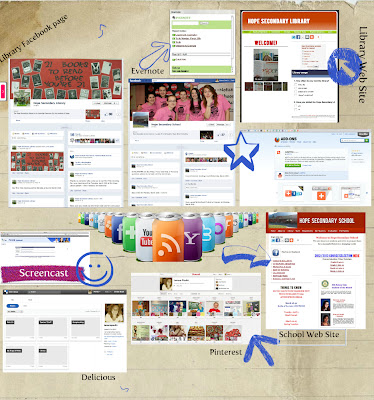
My first Glog!
Since I was exploring Web 2.0 tools I thought Hey! Why not try making your first Glog at the 11th hour to show what else you explored?  So I did :)  Thank goodness for scrapbooking and Yearbook experience.  It was fun to make the Glog and I can see lots of applications for this in the classroom.  I just had my students create visual found poems from  The Kite Runner and this would be an excellent tool for that.

On the Glog you will see that I also did my first screencast during this inquiry.  It was to help out our Student Services department in making tutorials to assist students and parents with course selections this year.  It was a lot simpler than any of us thought, and without sounding like too much of a braggart, I did mine in one take!  I have linked the screencast HERE.  I will definitely be adding this to my library web site to direct students to different areas of the site.  I think it would also be a good feature on my class blog for first time visitors - a sort of "Start Here" button.

I am also using Facebook for both my library and the school and created a new web site for our school.  I was able to use many of the skills and information I learned in my inquiry and from classmates to make sure I had strong elements in the case of the web site, and smart settings for the Facebook pages.

I was already exploring Pinterest before this course but I enjoyed helping others see the educational value of this bookmarking tool and I found some great pins as a result.  I also updated my Delicious account and like that it has more of a Pinterest feel to it.  I still prefer Pinterest but I want to explore Delicious a bit more to see if it can win me over.

Evernote is the tool I decided to try to link my devices and to rid myself of paper to-do lists.


One of the things I like about Evernote is that I can create voice messages/reminders.  Now.... IF I had an iPhone I could just use that, LOL, but this does work great on the iPad and I have added it to my iGoogle page, again so it is visible.  I still find myself grabbing a "Sticky Note" for quick reminders but for longer lists I am trying to make Evernote a habit.

The last tool that has been a huge time saver during this inquiry has been AddThis.  By downloading the AddThis toolbar across the top of my browser window I can easily add web content to any of my blogs, Facebook, Twitter, Delicious, and hundreds of other social networking and Web 2.0 sites with just one click.  I love that when I find an article on Twitter I can post it to my blog, or when I read a news article I can save it to my class blog to share.  I don't have to look for codes or URLs, AddThis does it for me.  Even when I press the Blogger button, it gives me the option of choosing which of my Blogger blogs I would like to post to, which was a concern the first time I used the feature.  Pinterest is not on the AddThis button bar but they do provide their own "Pin It" button to add to my toolbar that works in the same way.  Thanks to one of my classmates I also discovered that the Bit•ly tool is on the AddThis bar so I can make smaller URLs for Twitter.

This has been a great experience and I look forward to sharing some of my more reflective thoughts and observations in my final reflection.  One of the final things I hope to do with this inquiry is keep up this blog as a place to store educational ideas and applications for my library and technology learning.  I also hope to seek out some professional development options next year, with more of a social networking/technology theme.  But for now... I put this inquiry to rest.


References:

Berger, P. & Trexler, S. (2010). Choosing Web 2.0 tools for learning and teaching in a digital world.
     Santa Barbara, CA: Libraries Unlimited.

Tuesday, March 6, 2012

Inquiry Update

It seems that I have been doing a lot of inquiry and playing, and not a lot of updating.  I think this is mostly due to the fact that many of the tools have become part of my daily routine, and less a "thing" that I am learning about and exploring.  I think this is a good thing :), but I thought I better spend some time commenting on my "findings."

Twitter - This has been a huge surprise for me.  I, like some of my classmates exploring this tool, have been surprised by the educational advantages of Twitter.  I expected Twitter to be a lot like Facebook, with people updating what they are eating, or where they are, but have discovered a wealth of information and a great feeling of connectedness with peers from all over Canada and the US.  I like that I have control over whom I "follow" and that I can choose to not follow people who tweet simple "I am at Starbucks."  During this stressful time in education in BC, I have also appreciated the feelings of support and a way to communicate our "issues" with others through Twitter.

Personally, I tend to "tweet" things that I am trying in my inquiry, like class blogging, or I "retweet" ideas and information that I think is worth sharing.  I have been using my inquiry blog as a place to store some great tutorials for Twitter and other tools in my inquiry, and I have also "favourited" ideas that I want to revisit.  I definitely have a "why reinvent the wheel" philosophy about Twitter.  So many people have already asked a question and many have written how-to articles or created videos to answer those questions.  I have found that some things are already becoming dated as Twitter has evolved but, especially among education Tweeters, the information provided is very useful.

There are a couple of things I am still working on with Twitter.  Firstly, I watched a video about "retweeting" but am still a bit unsure that I am doing it "correctly."  The video talked about copying the original tweet and then adding "RT" and pasting the tweet after this.  My question is then, why is there a "Retweet" icon?  This does the same thing but without the "RT."  Is the "RT" necessary?  By following others' retweets, it seems that many use the suggested format, and others just use the "Retweet" button.  I have done both and don't really see that it makes much difference for me as a follower other than knowing it is a retweet right at the beginning.

My other question is about the smaller URLs some Tweeters use for links.  I have not done any inquiry into this but it looks to me that this is another Web 2.0 tool available.  It definitely helps in limiting the number of characters in a tweet so I need to look into this.  I did have one thing I retweeted result in a "mention" that led me to the following link:

I have not been able to trace the tweet that resulted in this "violation," but I will be checking out TinyUrl to learn more.

UPDATE: - I realized, thanks to the comments of my classmates, that I have a bit.ly link on my AddThis toolbar. Cool!


Kidblog.org - I have stuck with this blog site for my class blog and have been very pleased with the results.  I have not encountered anything that would cause me to change sites at this time.  My students have found it easy to navigate and we were even able to upload some of their visual found poem assignments to share with other class members.  The students seem to like the format and responded well to doing their writing on a blog.

As the teacher, I too find it easy to navigate.  I have been able to evaluate their posts and responses quite easily and I like that I can see who posted and when so that I can remind them to keep up-to-date with their assignments.

My husband, who teaches grade 6, is also using this site with his class. There were some initial "emergency" phone calls to me the first time they used it - my husband is a bit on the technologically challenged side - but once they got going he said they wanted to do all their discussions on the blog.

The security of the site is nice, especially for elementary students and I suspect this is why the site says it is ideal for these aged students.  Visitors can see that there is a blog but they cannot read any of the posts unless they are logged in.  I also like that I did not have to provide any personal information about my students, and even though I used their real names, it would be easy to set it up with nicknames or something similar, to create complete anonymity for the students.  I can make my class sites public if I want and I may explore this option next year.  It would be nice to find a similar class in another school to blog with so that the students could get feedback and comments from outside their class.

RSS/iGoogle/Google Reader - When beginning my inquiry into RSS feeds I, as I said in an earlier post, was surprised that I was already "signed up."  I then made iGoogle my internet home page and I haven't looked back.  What a time saving tool this is!  I can see who has updated blogs or sites that I visit regularly without actually having to go to the site - I love this!  It has also allowed me to comment on my classmates blog posts and I have really appreciated the feedback I have received from them.

I have added Delicious, Facebook, Twitter, Google Calendar, and even my local weather to my home page.  I want to add Pinterest, as I prefer this to Delicious, and if I am following others' posts correctly, this could soon be an option.

I try to clear my Google Reader feed a couple times a day but I have also used the "mark all as read" feature a few times.  I realize I don't need to read every new post and that I will need to adjust some of the subscriptions I have added.  One site, YALSA, seems to have upwards of ten updates a day.  Do I really need this as a subscription?  This will be part of the adapting process as I continue to develop my PLN.

Google Apps - I am using iGoogle, Google Reader, and Google Calendar.  I am also in the processing of introducing Google Docs to my students.  As the librarian and technology support person in my school I am trying to get students to use this tool to prevent the issues that arise when they have a PC at home, and we have all MACs at our school.  I have used Google Docs personally in other classes to work collaboratively, and have really liked the ease of use.  The teachers I worked with and I also really liked the "chat" feature as we worked on an assignment.  We could discuss and edit at the same time.  After spring break my English 12 students will begin their Lit Circles and I think this will be a good time for them to blog and use Google Docs to share their discussions about their novels.  The online nature of the program is great as they do not have to be at school to work together.

There have been a couple of great links for using Google Apps in education that I still want to investigate further.  I would like to try using Google Calendar for our computer lab bookings so that teachers can do this without having to physically come to the library to reserve lab space.  I would also like to get more staff members using these tools so that we can share ideas and lessons.

Survey Tools - This is one area of my inquiry that I have not explored much yet.  I did set up an account with Survey Monkey and attempted to create a survey about our school and library web sites.  I began by using one of their templates but became frustrated because it wouldn't let me do the changes I wanted to make to the questions - which it claimed I should be able to do.  Admittedly, I did not give myself enough time for this exploration so my rushing probably had something to do with the frustration.

I maintain both the school and library web sites and would like to at least have a poll to see who is using the sites and why.  I use Weebly for the web sites and I do have access to a poll option so I am going to explore that.  I am not sure how much use I really have for a survey in my teaching and library.  Right now I am more focused on directing people to the sites and the physical library and I am not sure we are ready for a survey yet.

iPad and Web 2.0 applications - I am loving the iPad - or more accurately, my three year-old is loving the iPad, LOL.  We have added lots of great apps for her to play with and I am amazed at how quickly she has learned how to operate this device.  We created a "folder" with "Apps for Lily" and she knows how to use all of them.  She can also get to her favourite shows on Netflix, save her art to the photo gallery, and listen to music.

I have been using the iPad to read my first ebook and am really liking this, despite my initial resistance.  I do feel a bit disloyal to books, but I think they will get over it, ha, ha.

I am curious to see what the new iPad 4 will offer.  I ran into my first "you need Flash to view this" problem yesterday when I was trying to view some video of my union demonstration when Premier Clark was in our town.  I could view the photos on Facebook but I could not go to the photographer's site to see the images and video in a slide show.

I have added the iGoogle app so I get my RSS feed on the iPad and I am using iCloud to connect my laptop, iPad and even my daughter's iPod.  I also am reading the Vancouver Sun through an app and am exploring iBooks, Kindle, and Kobo to compare different eReader options.  So far I do not really see much difference visually.  I think access to ebooks is the main difference.

I also signed up for some iTunes U "courses" to explore this app on the iPad.  I chose a technology course that I intend to view during my spring break.

Web 2.0 mentoring - My principal is being stubborn, LOL.  I sent her a friendly "prodding from the demonstration line" today hoping that she might be able to find 10 minutes over these next couple of days to do a blog update.  I know she is busy but I know that once she makes a habit of posting she will see the benefits of this great communication tool.

My inquiry has led to other staff members using the tools I have been exploring.  There are now 5 or 6 of use on Twitter and two other staff members are using iGoogle.  One of my colleagues is exploring Tweetdeck so I am curious to see how he likes this tool.  We also created Facebook pages for our school and library that I and one other staff member keep updated.  It is exciting that other staff members are now emailing us with things they would like us to post.  Facebook can be such a great tool, especially for connecting with students.

Inquiry leads to inquiry - If anything, this inquiry has gone well beyond the six tools it was originally suggested we explore.  I am using my AddThis tool bar regularly, especially to post ideas from Twitter to my blog or other links to Twitter.  This is one of my favourite "accidental" finds.

Another benefit of this inquiry has been the continued development of our school and library web sites.  I had created the library web site in the fall and planned to redesign the school web site after Christmas.  Through my inquiry into Web 2.0 tools I have been able to make the web site even better than I had originally hoped.  We have links to our Facebook page, slide shows, and "share this site" buttons so others can help us communicate with our learning community.  The speed of this tool was especially evident as our teacher job action began to unfold.  We were able to post information for parents and keep student updated on what to expect this week.  I tried to remember what we did back in 2005 when we were on strike for 2 weeks - signs on school doors and lots of phone calls I suspect.

I am also exploring Evernote as a way to connect my devices and perhaps get rid of my paper "to do" lists.  I have not made this tool a priority, yet, but I would really like to become as paperless as possible so I am hoping this may be an answer.

Thus far, I am very pleased with how my inquiry is progressing.  I like that I am actually using the tools I am exploring.  I continue to be amazed by the wealth of information and tools available to me.  At times it is a bit overwhelming and I am envious of people who seem to know all the latest tools.  I realize too, that I could spend entire days exploring these tools but that I have to set boundaries so that my "regular" work still gets done.  I do appreciate however, that these tools are making my "regular" work better and more efficient.

I have accumulated a stack of reading, both online and in print that I would also like to consider and add to this inquiry.  Most of my exploration has been my own but I would like to now "back it up" with some research and ideas from "experts" in various fields.  I think this will add some depth to my inquiry, and perhaps lead me to better practices in using Web 2.0 tools.

Wednesday, February 15, 2012

Progress Update or... inquiry leads to inquiry leads to inquiry...

Well, if I have learned anything in this inquiry project so far it is that inquiry leads to more inquiry.  I sit down ready to post and comment on my learning or to explore one of my inquiry choices and I end up blurry eyed from "clicking" from one site to the next.  Just before beginning this post I was sidetracked by a classmates mention of festisite and had to go check it out.  I actually had to talk myself down from playing on the site so I could complete a more substantial post on my learning blog today, LOL.

This week's small group discussion topic lead me to make some changes in how I am organizing my Web 2.0 world.  Admittedly, I am a "bookmarks" fan - but I just use the bookmarks bar to have easy visual access to the places I visit most.  I had been using my learning blog for this class and LIBE 465 to store links to my classmates' blogs in each class.  Because of my increased PLN, mostly due to Twitter, I realized I was not keeping up with what was happening.

I am a very visual person and need to "see" the links and sites I want to visit regularly.  I signed up for Delicious a year ago, but after the initial set-up and two days of adding "bookmarks" I quickly forgot about it and found it inconvenient.  But alas, I had an AHA moment this week.

I was researching RSS feeds and thought I would check out Google reader.  When I "clicked" the option, lo and behold I am already signed in and there is a list of the class blogs I had subscribed to!  Who knew?  This demonstrated to me how blind I have been to what I am already involved with in the Web 2.0 world.  I did not understand what "subscribe to this blog" meant or that I could easily access this information with one more "click."

Knowing my visual nature I was still concerned that the Google reader feeds required that I go to that Google page, but wait, what's this iGoogle?  Click!  AAAHHHHH, the heavens opened...  This is the answer I have been looking for.  I can add widgets for the things I check regularly and I can make it my Internet home page so it is "in my face" every time I log on.
I know that I need to "live" with this new tool for a bit to get it set up to best meet my needs, but so far I am really liking this organizational tool. (Although it wasn't originally part of my inquiry I think it is a great link for all of the items I am learning about.)  I just added the Google calendar widget today and the Google reader widget is awesome!  I know that I need to be careful not to add too many widgets or this tool might become more of a burden - although I'm not sure I can get rid of the "Hangman" game that Google already had on there, LOL.

I will definitely be introducing iGoogle to a couple of my staff "mentees" for their home pages.  I think they will find this a great way to organize their online social networking.