Showing posts with label iPad. Show all posts

Wednesday, March 28, 2012

Web 2.0 Mashup


The last parts of my initial inquiry proposal were exploring the iPad and mentoring others about Web 2.0 applications and tools.  As Joanne pointed out to me, the iPad is not a Web 2.0 tool and mentoring didn't really qualify in this category either.  I really appreciate that she did not discourage me from these inquiries, nor did she require that I select different options.  Interestingly, I think she was being the wise Yoda, and knew that "To inquiry inquiry leads."  As I read and commented on my classmates' blog posts, I along with them, realized that we had explored more than 6 Web 2.0 applications, and that often the new tools we found were more interesting and more suited to our needs than the initial tools we set out to explore.

I did use our school's iPad2 during this entire inquiry project.  The iPad was purchased last year by the library but virtually had not been touched.  After some initial issues with the previous librarian's Apple ID having been used to add apps, I was able to use the iPad with quite a bit of success.


I added several apps to the iPad and I also grouped some of the apps into folders - Social Networking, Games, Books, and Lily.  Grouping the apps kept things neat and, in the case of the "Lily" folder, my 3-year old could find the games and apps that were appropriate for her.


I like that I can access my iGoogle page and often find myself reading through feed updates in bed before I do a bit of reading.  I find this much more manageable than my laptop in bed.  The iPad was also a great "gadget" to have during our recent vacation to San Diego for spring break.  My 3-year old was kept occupied in the airport and on the plane - once she got over her tantrum that Netflix wouldn't work on the plane - and we enjoyed looking up information about the places we had visited or were planning to visit.

Reading on the iPad has also been enjoyable.  I am currently reading Crossed, by Ally Condie, the sequel to Matched, another teen series featuring a dystopian society.  I have enjoyed reading the books in an ebook format much more than I had anticipated.  It was extremely convenient on vacation to not have to lug two or three books for the trip - and a lot lighter too.  I also uploaded two free audible books that Lily loves - I will definitely be exploring this more for her.

There are definitely some differences when using the iPad for Web 2.0 applications.  Appearance is the most obvious difference.  In both Facebook and Twitter it is necessary to flip between pages, however after the initial learning curve I did not find this bothersome.  I also like that I had the iPad user manual on my iBook bookshelf and I referred to it frequently in the beginning when learning how to do things like screen shots, creating folders, and saving the incredible art work that Lily had created or the photo essays my 11-year old, Arden, had left for me.

Lily art - age 3
Arden playing with the Photo Booth app - age 11

My principal has let me down a bit with her blog.  She seemed so keen but she has not made it a priority, so it has not become a habit.  I did send her another "gentle reminder" on Monday that she may want to do a Welcome Back post or provide some information about the course selection process that is happening this week.  I do subscribe to her blog so hopefully I will get notification soon that she has created a new post.  I am not going to give up on her and her blog as I think it is a really important communication tool.  Part of the problem is that she is not really excited by, or into new technologies and applications.  Until she sees some positive results of her foray into the Web 2.0 world, her blog will remain a "thing" that I remind her about, instead of a tool.  Berger and Trexler (2010) say in the forward to Choosing Web 2.0 tools for learning and teaching in a digital world, that people who are waiting for the Web 2.0 to go away are "hopelessly mistaken." (Berger & Trexler, 2010, p.vii)  They warn that we must adapt to "shifts in the information and communication landscapes," and these shifts "represent profound changes in the way we do business, the way we do libraries, the way we must educate." (Berger & Trexler, 2010, vii)

So what other things did I explore and adopt in the Web 2.0 world as a result of this inquiry?
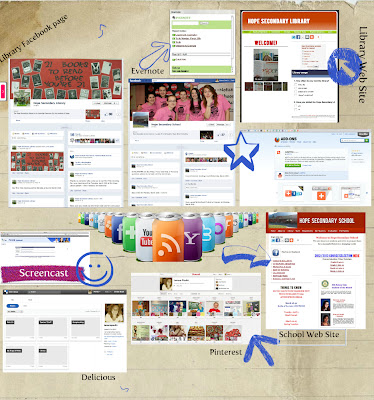
My first Glog!
Since I was exploring Web 2.0 tools I thought Hey! Why not try making your first Glog at the 11th hour to show what else you explored?  So I did :)  Thank goodness for scrapbooking and Yearbook experience.  It was fun to make the Glog and I can see lots of applications for this in the classroom.  I just had my students create visual found poems from  The Kite Runner and this would be an excellent tool for that.

On the Glog you will see that I also did my first screencast during this inquiry.  It was to help out our Student Services department in making tutorials to assist students and parents with course selections this year.  It was a lot simpler than any of us thought, and without sounding like too much of a braggart, I did mine in one take!  I have linked the screencast HERE.  I will definitely be adding this to my library web site to direct students to different areas of the site.  I think it would also be a good feature on my class blog for first time visitors - a sort of "Start Here" button.

I am also using Facebook for both my library and the school and created a new web site for our school.  I was able to use many of the skills and information I learned in my inquiry and from classmates to make sure I had strong elements in the case of the web site, and smart settings for the Facebook pages.

I was already exploring Pinterest before this course but I enjoyed helping others see the educational value of this bookmarking tool and I found some great pins as a result.  I also updated my Delicious account and like that it has more of a Pinterest feel to it.  I still prefer Pinterest but I want to explore Delicious a bit more to see if it can win me over.

Evernote is the tool I decided to try to link my devices and to rid myself of paper to-do lists.


One of the things I like about Evernote is that I can create voice messages/reminders.  Now.... IF I had an iPhone I could just use that, LOL, but this does work great on the iPad and I have added it to my iGoogle page, again so it is visible.  I still find myself grabbing a "Sticky Note" for quick reminders but for longer lists I am trying to make Evernote a habit.

The last tool that has been a huge time saver during this inquiry has been AddThis.  By downloading the AddThis toolbar across the top of my browser window I can easily add web content to any of my blogs, Facebook, Twitter, Delicious, and hundreds of other social networking and Web 2.0 sites with just one click.  I love that when I find an article on Twitter I can post it to my blog, or when I read a news article I can save it to my class blog to share.  I don't have to look for codes or URLs, AddThis does it for me.  Even when I press the Blogger button, it gives me the option of choosing which of my Blogger blogs I would like to post to, which was a concern the first time I used the feature.  Pinterest is not on the AddThis button bar but they do provide their own "Pin It" button to add to my toolbar that works in the same way.  Thanks to one of my classmates I also discovered that the Bit•ly tool is on the AddThis bar so I can make smaller URLs for Twitter.

This has been a great experience and I look forward to sharing some of my more reflective thoughts and observations in my final reflection.  One of the final things I hope to do with this inquiry is keep up this blog as a place to store educational ideas and applications for my library and technology learning.  I also hope to seek out some professional development options next year, with more of a social networking/technology theme.  But for now... I put this inquiry to rest.


References:

Berger, P. & Trexler, S. (2010). Choosing Web 2.0 tools for learning and teaching in a digital world.
     Santa Barbara, CA: Libraries Unlimited.

Tuesday, March 27, 2012

Twitter

I was afraid of Twitter before I actually became a user.  It seemed "dumb" and pointless.  I already had Facebook, what did I need Twitter for?  I honestly thought it was a bunch of celebrities and wannabes posting about their every move, I did not know there was so much great "stuff" on Twitter.  Steven Johnson (2009), in his article for Time Magazine says that "the one thing you can say for certain about Twitter is that it makes a terrible first impression." (Johnson, 2009, p. 1)  But as he later points out, "Twitter turns out to have unsuspected depth." (Johnson, 2009, p. 1)  I realize Johnson was writing about Twitter three years ago, but I would argue that his point still stands.  The proof of this is not just in my experience, but also in the experiences of other classmates who included Twitter as part of their inquiries.  Berger & Trexler (2010) tell us to "keep an eye on Twitter - we'll be seeing more instructional use in the near future!" (Berger & Trexler, 2010, p. 172) and they were right.  It almost seems like Twitter has "grown up," or perhaps we, as its users, have changed how Twitter can and is being used.


Here is another shameless plug as to why I NEED an iPhone, LOL.  Twitter is full of so many great ideas that it is easy to get wrapped up in scrolling through tweet after tweet.  When I first signed up I felt a bit overwhelmed and almost "worried" that I was going to miss something.  I have definitely limited the time I now spend on Twitter, but I know that if I had mobile access I could use it more, and use some of my "down time" to browse tweets from the day. (like when my daughters are at one of their activities)  I have found that it is easy to use Twitter on the iPad but I miss my "AddThis" bar - which is not available for the iPad... yet.  I am going to be attending Leadercast 2012 and I know that people will be tweeting during the event.  I am hopeful there will be WiFi so that I can use my laptop or iPad.  

Tweeting during events/conferences is one area that really interests me.  My friend, Maureen Parker, Director of Curriculum for the Battle River School Division in Alberta, is always posting interesting observations, quotations, and comments from events and conferences she attends and organizes.  I was also recently following Steven Anderson, during his attendance and presentations at #ASCD12.  There are so many great ideas that can be shared via Twitter, that previously would be left in someone's complimentary conference padfolio.  I like that these ideas can now be stored, retweeted, favourited, or read and discarded quickly, and often in "real time."

I do find that I am actually a bit intimidated when it comes to actually tweeting.  I feel this pressure to be somewhat profound or at least a little inspirational.  I often wonder what people like @web20classroom, @mrwejr, and @shannoninottawa actually do all day besides Tweet?  I don't have that kind of time and I'm not sure I want to be always thinking about how I can turn what I am doing, learning, or experiencing, into a tweet.  I know that for some, Tweeting is their job, but for others, it is not, they have just made it a priority in their daily activities.  Chris Wejr, @mrwejr, is a principal in my school district, and also a former student.  He is very active and well known in the social media world and education.  His iPhone is literally an extension of his hand, and often I don't even notice that he is tweeting while having a conversation or walking down the hall.  He is passionate about taking education is new directions and he is using Twitter to influence this change.  I still wonder however, are we just tweeting about "it," or actually doing?  Are we embedding the ideas we see and learn about on Twitter into our classrooms, schools, personal learning, or are we just appearing to be on the cutting edge because we tweet about all of these ideas?

Twitter has made me more philosophical about education and my teaching than I expected.  I am still trying to decide where Twitter fits in my vision and personal learning plan.  Do I want to use Twitter for ideas and contacts?  Or do I want to be part of the "trends" on #edchat or #edtech?  Twitter can be very overwhelming if I was to feel the need to implement every idea or theory that is tweeted.  The skill comes in discerning which tweets are worth a second look and which are people who are all about the trend, and not about the substance.

References:

Anderson, S. (2012, March 26). #ASCD12 - A Presentation On Creating Social Media Policies For 
     Schools And Districts [Web log post]. Retrieved from http://blog.web20classroom.org/

Berger, P. & Trexler, S. (2010). Choosing Web 2.0 tools for learning and teaching in a Digital World.
     Santa Barbara, CA: Libraries Unlimited.

Johnson, S. (2009, June 5). How Twitter will change the way we live. Time. Retrieved from
     http://www.time.com

Monday, March 26, 2012

Disconnecting from the Web 2.0 world - Is it possible?

I am just returning from a 2 week spring break vacation.  I feel very fortunate to have had this time to relax and be with my family.  We love to travel and this year decided to go to San Diego, California for 10 days.  Not unlike most of the other families who were traveling on similar spring break adventures, we brought along our "gadgets."  My 11-year old had her iPod and I had my iPad and laptop.  I really wanted to "disconnect" on this holiday as I was beginning to feel that I am constantly plugged into some device and I also wanted to distance myself from the labour strife that has been plaguing BC teachers since September.  I brought the iPad, I told myself, to keep my 3-year old occupied on flights and in the hotel room in the evenings.  I brought my laptop, I told myself, because I had to finish an assignment for my LIBE 465 class and it was due during my vacation.  The good thing is, I finished the assignment and then did manage to disconnect from much of my web world.  The bad thing is, I am now paying the price.

I did not put my devices away and not use them at all, quite the contrary.  I was still checking Facebook as I had friends in the Dominican and Hawaii and I was curious about their adventures.  I checked Twitter for updates on Bill 22 legislation, and I checked my email to prevent a backlog of emails I knew I would have if I didn't check daily.  But I mostly used my devices for pleasure.  I read 2 books on the iPad, an experience I am actually really enjoying despite thinking I would never give up reading "real" books.  I am also enjoying doing crosswords, playing Angry Birds and reading audible books with my daughter, and playing a "little" (wink, wink) solitaire every now and then.

While on vacation I tried to remember what we did "before" - before we could be connected 24/7?  We used to go on holidays and get the post office to hold our mail.  We missed calls or if we had an answering machine, the messages were recorded for our return.  We used to leave names of hotels, flights and destinations with friends and family "in case of an emergency." We used to just wait until we got home to hear about what other people were doing.  Before we were connected 24/7, I would not have gone on vacation if I was taking a course because I would have been in a classroom and could not have handed my assignment in electronically.  (Although I will say I had a bit of panic when it took 10 minutes to upload my assignment to Vista, so I then spent the next hour uploading my 40 page PowerPoint to my course blog and my library web site "just in case.")

I realized how much I enjoy being "connected" while on vacation.  We would scout locations online for our next day's outings.  We planned meals by searching for Diners, Drive-Ins, and Dives locations - yep, we ate at 2!  And we "chatted" with family and friends to share our stories.  The difference between this vacation "connectivity" and the regular connectedness I have during my work life, is that this was more for fun.  I wasn't researching a tool or searching for an article to support my "findings."  I was using my web 2.0 tools in a different way.  The irony is of course, that I am still using these experiences to support my learning in this class and in my library.  I am never so far removed from my work life that I don't think about it at all.  Everywhere I go I think about how I can apply "this" to school, to teaching, to my library.  One of the first things I did this first period in English 12 was share my holiday stories with my students.  Even though my connectedness was different, it was, and now I know, always will be, relevant to my work and home life.  I am realizing that the web and the tools it has to offer, are part of me now, they aren't just something I am trying or experimenting with. 

I think another thing I am realizing is how much I need an iPhone.... I know, my husband is laughing now too.  It really was just a want before but now I realize I need one if I want to maintain and move forward in my use of technology and web 2.0 tools.  The one element I am missing is the portability of my devices.  My iPad and laptop are only useful when I have Wifi and the iPad is still a bit cumbersome when hauling "kid gear" on a vacation - I don't need to be worrying about the iPad too.  I would like to be able to record ideas, snap a photo to remember a sign or information, make a list of things to remember, or even look up information about something unexpected on the trip.  I would also have ideas for this blog or my other course that I wish I could have make note of quickly rather than waiting to get back to the hotel later in the day.

While it was nice to disconnect from my course work and job action, I am regretting this decision now.  I did do quite a bit of course work but did not update my posts.  I will now "pay" for this decision over the next couple of days as I upload my posts to my blog, edit the ones I have saved, and go back to add images, tags, and links.  I realize that it is not possible to be completely disconnected from my web 2.0 world, despite the need to relax and relieve some very real stress.  This does make me wonder how our 24/7 connectedness is contributing to that stress - it is very different when you can't do something because you are away, and choosing not to do something even when you can while you are away.

Tuesday, March 6, 2012

Inquiry Update

It seems that I have been doing a lot of inquiry and playing, and not a lot of updating.  I think this is mostly due to the fact that many of the tools have become part of my daily routine, and less a "thing" that I am learning about and exploring.  I think this is a good thing :), but I thought I better spend some time commenting on my "findings."

Twitter - This has been a huge surprise for me.  I, like some of my classmates exploring this tool, have been surprised by the educational advantages of Twitter.  I expected Twitter to be a lot like Facebook, with people updating what they are eating, or where they are, but have discovered a wealth of information and a great feeling of connectedness with peers from all over Canada and the US.  I like that I have control over whom I "follow" and that I can choose to not follow people who tweet simple "I am at Starbucks."  During this stressful time in education in BC, I have also appreciated the feelings of support and a way to communicate our "issues" with others through Twitter.

Personally, I tend to "tweet" things that I am trying in my inquiry, like class blogging, or I "retweet" ideas and information that I think is worth sharing.  I have been using my inquiry blog as a place to store some great tutorials for Twitter and other tools in my inquiry, and I have also "favourited" ideas that I want to revisit.  I definitely have a "why reinvent the wheel" philosophy about Twitter.  So many people have already asked a question and many have written how-to articles or created videos to answer those questions.  I have found that some things are already becoming dated as Twitter has evolved but, especially among education Tweeters, the information provided is very useful.

There are a couple of things I am still working on with Twitter.  Firstly, I watched a video about "retweeting" but am still a bit unsure that I am doing it "correctly."  The video talked about copying the original tweet and then adding "RT" and pasting the tweet after this.  My question is then, why is there a "Retweet" icon?  This does the same thing but without the "RT."  Is the "RT" necessary?  By following others' retweets, it seems that many use the suggested format, and others just use the "Retweet" button.  I have done both and don't really see that it makes much difference for me as a follower other than knowing it is a retweet right at the beginning.

My other question is about the smaller URLs some Tweeters use for links.  I have not done any inquiry into this but it looks to me that this is another Web 2.0 tool available.  It definitely helps in limiting the number of characters in a tweet so I need to look into this.  I did have one thing I retweeted result in a "mention" that led me to the following link:

I have not been able to trace the tweet that resulted in this "violation," but I will be checking out TinyUrl to learn more.

UPDATE: - I realized, thanks to the comments of my classmates, that I have a bit.ly link on my AddThis toolbar. Cool!


Kidblog.org - I have stuck with this blog site for my class blog and have been very pleased with the results.  I have not encountered anything that would cause me to change sites at this time.  My students have found it easy to navigate and we were even able to upload some of their visual found poem assignments to share with other class members.  The students seem to like the format and responded well to doing their writing on a blog.

As the teacher, I too find it easy to navigate.  I have been able to evaluate their posts and responses quite easily and I like that I can see who posted and when so that I can remind them to keep up-to-date with their assignments.

My husband, who teaches grade 6, is also using this site with his class. There were some initial "emergency" phone calls to me the first time they used it - my husband is a bit on the technologically challenged side - but once they got going he said they wanted to do all their discussions on the blog.

The security of the site is nice, especially for elementary students and I suspect this is why the site says it is ideal for these aged students.  Visitors can see that there is a blog but they cannot read any of the posts unless they are logged in.  I also like that I did not have to provide any personal information about my students, and even though I used their real names, it would be easy to set it up with nicknames or something similar, to create complete anonymity for the students.  I can make my class sites public if I want and I may explore this option next year.  It would be nice to find a similar class in another school to blog with so that the students could get feedback and comments from outside their class.

RSS/iGoogle/Google Reader - When beginning my inquiry into RSS feeds I, as I said in an earlier post, was surprised that I was already "signed up."  I then made iGoogle my internet home page and I haven't looked back.  What a time saving tool this is!  I can see who has updated blogs or sites that I visit regularly without actually having to go to the site - I love this!  It has also allowed me to comment on my classmates blog posts and I have really appreciated the feedback I have received from them.

I have added Delicious, Facebook, Twitter, Google Calendar, and even my local weather to my home page.  I want to add Pinterest, as I prefer this to Delicious, and if I am following others' posts correctly, this could soon be an option.

I try to clear my Google Reader feed a couple times a day but I have also used the "mark all as read" feature a few times.  I realize I don't need to read every new post and that I will need to adjust some of the subscriptions I have added.  One site, YALSA, seems to have upwards of ten updates a day.  Do I really need this as a subscription?  This will be part of the adapting process as I continue to develop my PLN.

Google Apps - I am using iGoogle, Google Reader, and Google Calendar.  I am also in the processing of introducing Google Docs to my students.  As the librarian and technology support person in my school I am trying to get students to use this tool to prevent the issues that arise when they have a PC at home, and we have all MACs at our school.  I have used Google Docs personally in other classes to work collaboratively, and have really liked the ease of use.  The teachers I worked with and I also really liked the "chat" feature as we worked on an assignment.  We could discuss and edit at the same time.  After spring break my English 12 students will begin their Lit Circles and I think this will be a good time for them to blog and use Google Docs to share their discussions about their novels.  The online nature of the program is great as they do not have to be at school to work together.

There have been a couple of great links for using Google Apps in education that I still want to investigate further.  I would like to try using Google Calendar for our computer lab bookings so that teachers can do this without having to physically come to the library to reserve lab space.  I would also like to get more staff members using these tools so that we can share ideas and lessons.

Survey Tools - This is one area of my inquiry that I have not explored much yet.  I did set up an account with Survey Monkey and attempted to create a survey about our school and library web sites.  I began by using one of their templates but became frustrated because it wouldn't let me do the changes I wanted to make to the questions - which it claimed I should be able to do.  Admittedly, I did not give myself enough time for this exploration so my rushing probably had something to do with the frustration.

I maintain both the school and library web sites and would like to at least have a poll to see who is using the sites and why.  I use Weebly for the web sites and I do have access to a poll option so I am going to explore that.  I am not sure how much use I really have for a survey in my teaching and library.  Right now I am more focused on directing people to the sites and the physical library and I am not sure we are ready for a survey yet.

iPad and Web 2.0 applications - I am loving the iPad - or more accurately, my three year-old is loving the iPad, LOL.  We have added lots of great apps for her to play with and I am amazed at how quickly she has learned how to operate this device.  We created a "folder" with "Apps for Lily" and she knows how to use all of them.  She can also get to her favourite shows on Netflix, save her art to the photo gallery, and listen to music.

I have been using the iPad to read my first ebook and am really liking this, despite my initial resistance.  I do feel a bit disloyal to books, but I think they will get over it, ha, ha.

I am curious to see what the new iPad 4 will offer.  I ran into my first "you need Flash to view this" problem yesterday when I was trying to view some video of my union demonstration when Premier Clark was in our town.  I could view the photos on Facebook but I could not go to the photographer's site to see the images and video in a slide show.

I have added the iGoogle app so I get my RSS feed on the iPad and I am using iCloud to connect my laptop, iPad and even my daughter's iPod.  I also am reading the Vancouver Sun through an app and am exploring iBooks, Kindle, and Kobo to compare different eReader options.  So far I do not really see much difference visually.  I think access to ebooks is the main difference.

I also signed up for some iTunes U "courses" to explore this app on the iPad.  I chose a technology course that I intend to view during my spring break.

Web 2.0 mentoring - My principal is being stubborn, LOL.  I sent her a friendly "prodding from the demonstration line" today hoping that she might be able to find 10 minutes over these next couple of days to do a blog update.  I know she is busy but I know that once she makes a habit of posting she will see the benefits of this great communication tool.

My inquiry has led to other staff members using the tools I have been exploring.  There are now 5 or 6 of use on Twitter and two other staff members are using iGoogle.  One of my colleagues is exploring Tweetdeck so I am curious to see how he likes this tool.  We also created Facebook pages for our school and library that I and one other staff member keep updated.  It is exciting that other staff members are now emailing us with things they would like us to post.  Facebook can be such a great tool, especially for connecting with students.

Inquiry leads to inquiry - If anything, this inquiry has gone well beyond the six tools it was originally suggested we explore.  I am using my AddThis tool bar regularly, especially to post ideas from Twitter to my blog or other links to Twitter.  This is one of my favourite "accidental" finds.

Another benefit of this inquiry has been the continued development of our school and library web sites.  I had created the library web site in the fall and planned to redesign the school web site after Christmas.  Through my inquiry into Web 2.0 tools I have been able to make the web site even better than I had originally hoped.  We have links to our Facebook page, slide shows, and "share this site" buttons so others can help us communicate with our learning community.  The speed of this tool was especially evident as our teacher job action began to unfold.  We were able to post information for parents and keep student updated on what to expect this week.  I tried to remember what we did back in 2005 when we were on strike for 2 weeks - signs on school doors and lots of phone calls I suspect.

I am also exploring Evernote as a way to connect my devices and perhaps get rid of my paper "to do" lists.  I have not made this tool a priority, yet, but I would really like to become as paperless as possible so I am hoping this may be an answer.

Thus far, I am very pleased with how my inquiry is progressing.  I like that I am actually using the tools I am exploring.  I continue to be amazed by the wealth of information and tools available to me.  At times it is a bit overwhelming and I am envious of people who seem to know all the latest tools.  I realize too, that I could spend entire days exploring these tools but that I have to set boundaries so that my "regular" work still gets done.  I do appreciate however, that these tools are making my "regular" work better and more efficient.

I have accumulated a stack of reading, both online and in print that I would also like to consider and add to this inquiry.  Most of my exploration has been my own but I would like to now "back it up" with some research and ideas from "experts" in various fields.  I think this will add some depth to my inquiry, and perhaps lead me to better practices in using Web 2.0 tools.

Wednesday, February 29, 2012

Can the iPad Really Replace Your Laptop?

Found this article via @mrwejr on Twitter. (a former student, BTW) As I am playing with my iPad I have been asking myself this question. Could this replace my laptop with an iPad? As it stands right now, and as the article concludes, it wouldn't work for me at this time. There are still certain web 2.0 tools and applications that don't function the same way on the iPad. But I'm having fun experimenting :)

Can the iPad Really Replace Your Laptop?

Monday, February 27, 2012

Reading on an iPad

OK, so I admit it, I am one of "those" people who said I would never be able to read on an ereader.  I love books and find it very difficult to imagine a world without them.  I can easily spend hours in a book store, browsing, skimming, reading.  I spend thousands of dollars on books every year - and that is just personally - it does not include what I spend in my library.  I also give books as gifts all the time and love to receive them.  (My favourite this Christmas is Forgotten Bookmarks by Michael Popek that my husband found for me.)  Two Christmases ago we bought my daughter a Kobo thinking she would love it.  She used it a lot at first but it now sits buried under the stack of paperbacks she is reading.  This inquiry however, made me realize I need to try this kind of reading.  What if I am wrong?  What if I do like reading on an ereader?...

Well, I have done just that and I think I may have to take back some of my nasty words.  Although I am still struggling with comfortably holding the iPad while I read, especially in bed, I am not finding the experience as negative as I thought I would.  I like that I am able to change the size of the font and am finding "sepia" an easier theme to read than the bright white, but overall the experience has been positive.  We are fortunate to have 2 weeks for spring break this year and I am seeing that reading on the iPad is going to be a lot better than lugging 3 or 4 books to San Diego for our 10 day vacation. (especially with the weight limitations on luggage, LOL)

So why is this experience better than I expected?  I think part of it is my realization that this technology is not going away.  I do see a future where textbooks and other educational reading will be done online.  I do see that I am already adapting to reading my course material on a screen rather than printing it all out as I did when I first began this diploma program.  I do see that I am already reading blogs, articles, twitter feeds and other material online on a daily basis.  I see that I am evolving when it comes to technology and information.

Some other observations I have made with regards to the iPad as I explore Web 2.0 tools:
  • I have to adapt to a different look for things like Facebook, Twitter and even my iGoogle page on the iPad.
  • Using the keyboard on the iPad requires a bit of skill as my texting thumbs and touch typing skills have to adapt to the screen keyboard.
  • Using iCloud has saved me time in setting up the iPad.
  • I am wondering how schools add apps to the iPad - do they set up an Apple ID for the school or does one individual take this on - and what do they do if that person leaves, as was the case for me.

Friday, February 24, 2012

Playing with an iPad in a web 2.0 world

I'm posting this from an iPad today. Had some fun just trying to get it all to work. The iPad was purchased last year by our now retired librarian, and I quickly learned that because he had added apps with his personal apple I'd, I could not do any of the updates. I had to revert to the original settings which resulted in these apps no longer working. At first I was mad as I had just purchased a book to read on the Kindle app and I thought I would lose it. After I reinstalled the apps, (all of which were free so not really a big deal)I discovered that my purchased book was stored in the archives and not lost after all, whew :)

Another new tool I am trying is iCloud. This was great for setting up the iPad as I was able to access the music and books my daughter had purchased recently for her iPod Touch. I also added some games from her iPod that my three year old daughter likes and I am hoping will be entertaining for our plane trip on spring break.

So far I have not experienced any difficulty in accessing and using the web 2.0 tools I am exploring on the iPad. I did add the Evernote app and want to see if that can help with my "to do list" obsession - I installed it on my laptop as well.

As a side note, I am loving iGoogle, especially Google Reader! What a great tool and it is saving me so much time. I have even been able to provide quick feedback to my principal when she has posted TWICE :) this week on her new blog.

Sunday, January 29, 2012

Inquiry Project Proposal


I am excited to do this inquiry project as it is giving me an “excuse” to play with many Web 2.0 tools that I have wanted to explore.  I am a very hands-on learner and learn best by doing.  I am not afraid of technology – thanks in part to the “back” or “undo” buttons :) - but often I can get in a rut of resorting to the things I know best.  I have been an active blogger for educational reasons for a year and have begun to explore web site design and social media applications for use in my school.  I have also had to quickly learn the ins and outs of our school computers and server since I became the librarian at the start of the school year.  I consider myself an “intermediate” when it comes to this inquiry project.

I have created a Google calendar for this assignment and have posted it on my blog.  I plan to update my progress with this assignment once a week, although I hope to post quick “reaction” posts when I try something new.  I will update the calendar with specific “tasks” as I do them.

With this inquiry I hope to:
•  become comfortable enough with the tools I am exploring to use them regularly – or perhaps realize they are not suited to my needs but I will at least understand why
•  become a technology go-to person in my school and offer mentorship for those who are interested in trying similar tools
•  improve the learning environment and opportunities for my students by offering different experiences and options for their education
•  create a Personal Learning Network (PLN) where I can continue to grow as an educator


Web 2.0 Tools to explore:

•  Twitter  - I signed up for Twitter on January 8, 2012.  My good friend Maureen Parker, who is the Director of Curriculum in the Battle River School Division has been urging me for about a year but I was resistant.  I was not aware, nor convinced, of the educational value of this tool.  Already I am seeing I was wrong.  For my inquiry I plan to begin by learning about the workings of Twitter, including how to use hashtags, “twitter speak,” and other tools to make Twitter effective.  I am already “following” many interesting people on Twitter and I would like to expand and in some cases, edit that list.  By the end of my inquiry I hope to have a routine with regards to posting, reading and sharing.  At this point I see my Twitter learning being focused on personal professional use but I then hope I can explore how I might use this tool in the classroom and library.

•  Google Apps for Education – I was familiar with some of the Google apps like calendar and documents but I did not know there was a specific section directed at education.  I like the idea that by using these apps students and I will have access to our materials regardless of our computer operating system.  I also like that students can work on things collaboratively.  I plan to begin by taking part in the online training Google has available.  I am then hoping to make use of the apps in “real” situations – such as creating my timeline on a Google calendar for this project.

•  Kidblog.org (and possibly other sites for student blogs) – I have been thinking about student blogging for about a year but have struggled with finding the “easiest” way to go about it.  I was concerned that getting students to set up their own blogs and then monitoring that would become too complicated.  A friend who teaches elementary school is using Kidblog.org so I thought this would be a good place to start.  I am already impressed with how easy it was to set up and that I could create the pages for all my students so they are now ready to go.  I am going to start with this platform but as I do my inquiry I also want to explore other options and compare features.  My hope is to be partially paperless for my English 12 classes in the 2012/2013 school year so I feel this is a good time to experiment.  I also have two awesome classes this year that I know will be willing to “play” with this tool with and for me.  I hope to include some of their feedback on my inquiry blog as part of my demonstration of learning.

•  Poll/Survey tools – I have wanted to include surveys and polls on our school and library web site so I think this is the perfect opportunity to do so.  I hope to try several options and will begin with “free” services.   I think this will be a fun tool to try but I also want to make sure it isn’t “too much” in the sense that polls and surveys are ignored because they are happening all the time.  I would like to explore other school uses for this kind of polling and see what appears to be the most effective.

•  RSS and Blog Aggregators – There is a widget for RSS on my Wordpress class blog but I honestly did not know what it meant.  I thought it had something to do with following my blog on a handheld device like a cell phone.  This will be one inquiry item that I know nothing about before I begin.  (Although I do know now that RSS stand for Really Simple Syndication.)  I need to do some research on RSS and I plan to share my findings and understanding on my blog.  Hopefully, by the end of the inquiry, I will be using RSS.

•  iPad – As I mentioned in a current event discussion post, the previous librarian at my school purchased an iPad at the end of last year before he retired and it has been virtually unused since.  I want to learn more about the iPad personally and then explore educational use options.  I did find it very convenient the other day when I was dealing with a computer that wasn’t working.  I could search for help on the iPad while I was working on the desktop computer.  I plan to watch many of the user videos and even try reading a book on the iPad so that I can better understand how it works and how our students and/or staff can use this tool.  I will post my reflections and experiences on my blog as well as good and bad apps that I find.

•  Social networking mentorship – I was the first staff member at my school to begin using a blog as a teaching tool.  I began last year by creating a blog where students can find out what we did in class that day, get any handouts or presentations that were given, and also where I could share interesting visuals, books I am reading, and links to educational sites or information.  This has been an incredible time saver for me as I no longer have to send stuff to the office for absent students, and parents can see what is going on in class any time.  I presented this tool at a staff meeting last year and there are now several other staff members who have created class blogs for this purpose.  Others have also added Facebook pages and Twitter to supplement this communication tool.  I would like to continue this “mentoring” role by getting my principal more connected to the Web 2.0 world.  She approached me about helping her set up a blog and I would like to work  with her to make it a success.  I plan to help her have a vision for the blog, get her comfortable with the platform she chooses, and also provide prompts and reminders to post regularly.  She has a Twitter account but has not tweeted since it was set up.  (I suspect it was a District Administrators’ pro-d activity set up by Chris Wejr who is a principal in our district and a “mover and shaker” in the Web 2.0 world – but many of the administrators did not follow through after the initial introduction to Twitter.)  I will provide a link to her blog on my inquiry blog and also ask her to provide feedback about the process – maybe even as a “guest blog post” on my blog.